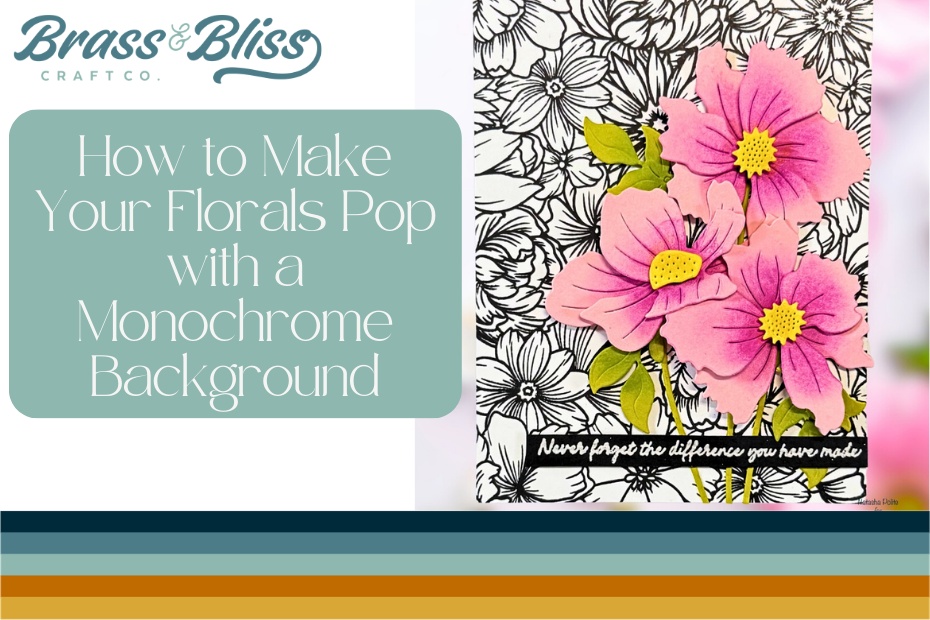
Looking for your next cardmaking staple? This intricate floral background stamp is sure to become your favorite this spring and make your floral cards POP!
Today we have a stunning Spring card from our designer Natasha, who said, “Florals are my jam! I hope you enjoy this high contrast card tutorial.” If you haven’t got your hands on the 37012 Floral background stamp yet, you’re going to want to “add to cart” after this card tutorial. Natasha is wowing us today by showing us how to make our florals pop with a monochrome background and bright contrasting layers. This card is truly delightful and has us itching to get into our craft room.

- Begin with an A2 panel of white cardstock. Stamp the large floral image from 37012 Floral Background – 5×8 Stamp Set using black ink.
- Die cut 2 of each die from the 5808-01D Build A Bloom Anemones Die . I used light pink cardstock for the flower petals, yellow for the centers, and green for the leaves and stems.
- Using Bubblegum and Fuchsia Color Fuse Inks (Color Fuse Set #5), add shading to all of the petals. Reference the packaging images to see where some shadows should be.
- Use Custard (Color Fuse Set #1) on the flower centers and Clover (Color Fuse Set #10) on the leaves.
- Use foam squares to assemble the flowers to create more dimension.
- Arrange the flowers towards the right side of the stamped card panel.
- Stamp and heat emboss a sentiment from 37047 Happy Retirement Stamp – 4×8 Stamp Set in white onto black cardstock and cut down to create a sentiment strip.
- Adhere this sentiment strip anchored towards the bottom right of the card.
- BONUS: Using the same supplies, stamp the floral background onto a panel using Chill Color Fuse Ink (Color Fuse Set #11) and stamp a sentiment in black ink directly onto the panel. Cut the panel down to 3 3/4 x 5 and adhere the remaining flower created above the bottom right corner. Pop this panel onto a white A2 panel.


